

Blog
Ring CAD Models: A Guide to Jewelry Blueprints
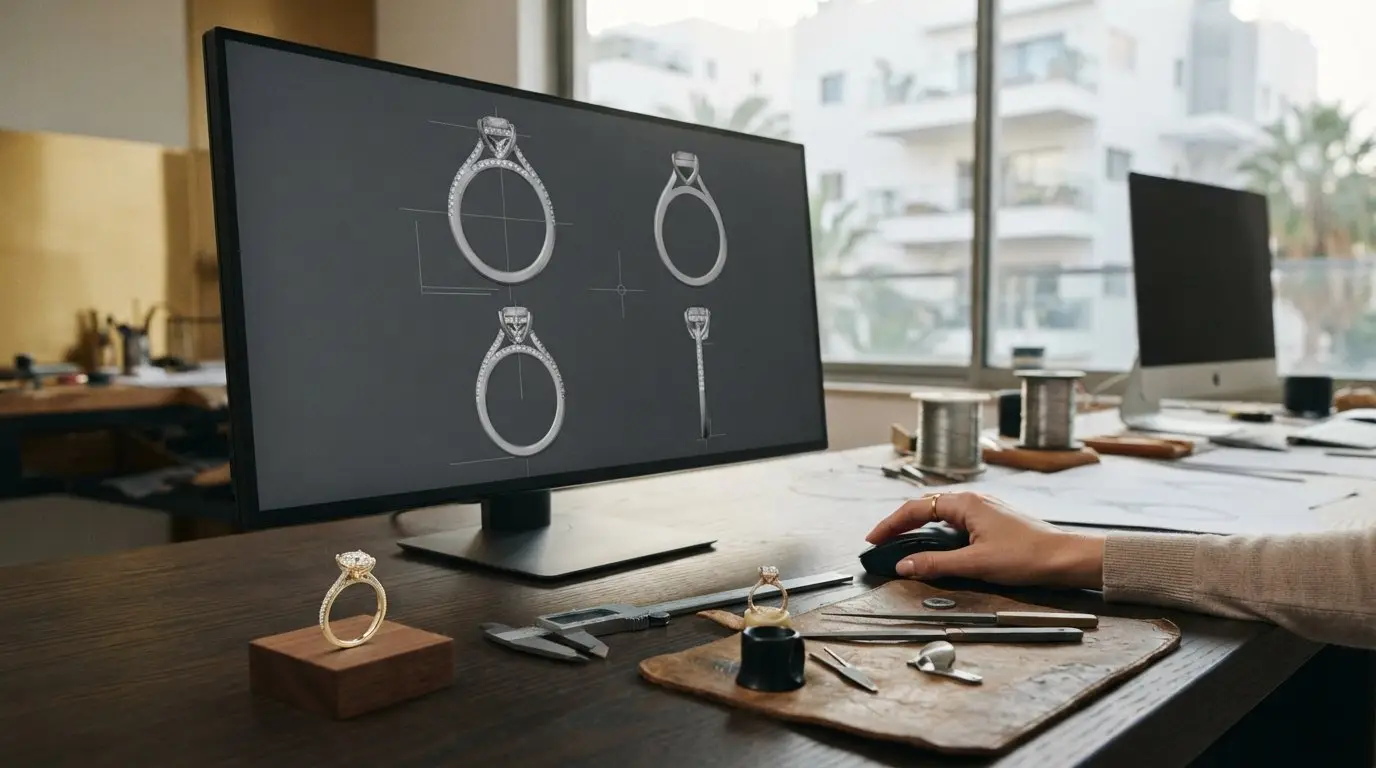
You finally receive the email containing your custom design, but instead of a sparkling heirloom, you see a robotic, gray-scale rendering with tiny numbers everywhere. It’s a common moment of doubt for many jewelry lovers. You might worry the band looks too thick or the prongs seem chunky, fearing that your vision for a delicate 18k gold piece has been lost in translation. It’s natural to feel overwhelmed by technical measurements when all you want is to feel the weight of a beautiful ring on your finger.
Understanding what is a CAD model for a ring and how to read it is the bridge between your imagination and the artisan’s bench. At KaMila Fine Jewellery, we believe the design process should be as joyful as the occasion you’re celebrating. This guide will teach you how to interpret those digital blueprints with confidence. We’ll explain the necessary allowances for casting and polishing, help you visualize how 2D renders transform into 3D gold, and ensure you feel empowered to approve a design that will eventually hold your lab-grown diamonds with grace and precision.
Key Takeaways
- Understand that a CAD model is a technical blueprint rather than a finished photograph, ensuring your artistic vision is captured with mathematical precision.
- Learn exactly what is a CAD model for a ring and how to read it by mastering the three essential viewing angles: top, profile, and through-finger.
- Discover why technical renders often look “clunky” and how to account for the 0.2mm to 0.3mm casting allowance that eventually results in a refined 18k gold finish.
- Gain the confidence to use our 5-point checklist to verify ring size and stone alignment before your design moves to the final casting phase.
- Visualize how digital blueprints evolve into a meaningful, hand-finished heirloom that perfectly reflects your personal story and identity.
What is a Jewelry CAD Model? The Foundation of Custom Design
Before a master jeweler ever touches a piece of 18k gold, your story begins as a digital architecture. A jewelry CAD (Computer-Aided Design) model is the precise mathematical blueprint of your future heirloom. While traditional artisans once relied solely on hand-carved wax, modern ateliers like KaMila Fine Jewellery utilize computer-aided design principles to ensure every millimeter is intentional. This digital file isn’t just a picture. It’s a complex set of instructions that tells a high-resolution 3D printer how to create a physical resin prototype. This resin becomes the master for the final casting in gold, bridging the gap between a dream and a wearable object.
If you’re wondering what is a CAD model for a ring and how to read it, think of it as the skeleton of your piece. It’s especially vital for the minimalist, modern designs we favor, where there’s no place for error to hide. The shift to digital drafting allows for a level of precision that hand-carving simply can’t match, particularly when we’re calculating the exact depth needed for secure stone settings or the subtle taper of a delicate band.
The Role of CAD in Modern Craftsmanship
Precision is the heartbeat of fine jewelry. For an 18k gold ring, CAD allows us to calculate the exact structural integrity of the shank. We ensure it’s durable enough for daily life in Israel’s vibrant environment while remaining elegant. When we integrate lab-grown diamonds, the digital model lets us map out the placement of every stone to the micron. This level of detail guarantees perfect symmetry and allows us to provide transparent data on metal volumes and stone weights before the first flame is lit. It’s about combining the soul of artisanal craft with the certainty of modern technology.
Why You Receive a CAD Before Production
Receiving your CAD is a milestone in the custom journey. It acts as the final technical contract between you and our artisans. It’s your chance to visualize proportions that are difficult to grasp from a simple sketch. You’ll see how the center stone sits against the band width and identify if a design feels too heavy or if a setting needs adjustment. Knowing what is a CAD model for a ring and how to read it gives you the peace of mind to move forward. You can approve the design knowing the final 18k gold piece will match your vision perfectly, avoiding any surprises when you finally open that velvet box.
How to Read a Jewelry CAD: Deciphering Dimensions and Renders
Learning what is a CAD model for a ring and how to read it involves looking past the gray, mechanical textures to see the mathematical precision beneath. Your design document usually presents an orthographic view. This means the ring is shown from fixed angles without the distortion of perspective. It’s a flat, technical representation that allows for exact measurements. You’ll also see a perspective render. This looks more like a 3D photograph, helping you visualize the finished aesthetic and how light might play across the 18k gold surfaces.
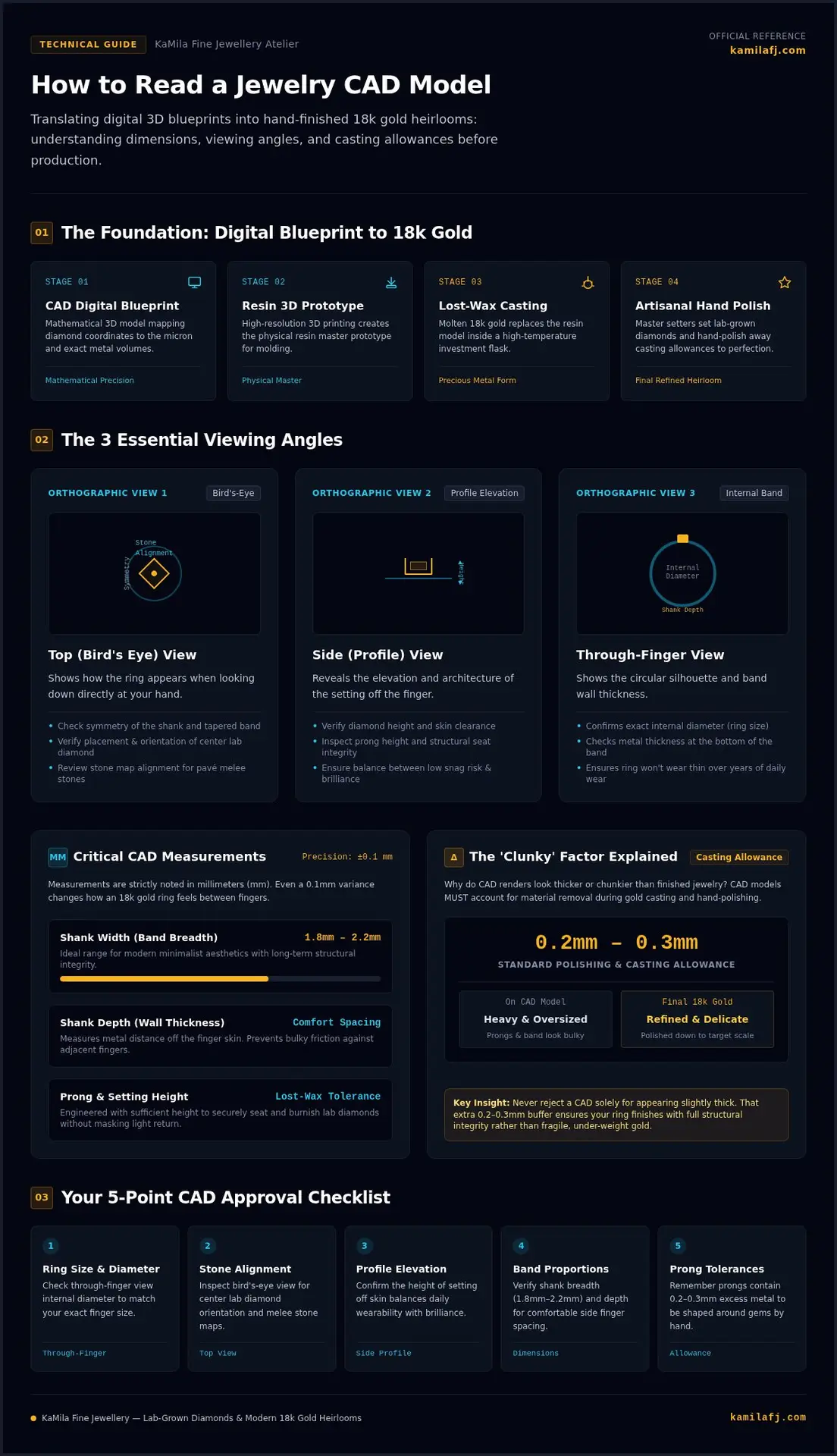
The document is divided into three primary perspectives. The Top View, or bird’s eye view, shows the ring as it looks when you look down at your hand. This is where you check the symmetry of the shank and the alignment of the stones. The Side View, or profile view, reveals the height of the setting. It’s crucial for seeing how far the diamond will sit off your finger. Finally, the Through-Finger View shows the circular shape of the band. This view allows you to verify the internal diameter and the thickness of the metal at the very bottom, ensuring it won’t feel too thin over years of wear.
Key Measurements to Verify
Measurements are always listed in millimeters (mm). Even a 0.1mm difference can change the feel of a ring. Pay close attention to the shank width, which is the breadth of the band. For a delicate but durable modern look, many clients prefer widths between 1.8mm and 2.2mm. The shank depth is equally important. This measures how far the metal sits off the surface of your skin. If it’s too deep, it might feel bulky between your fingers. Lastly, check the prong height. These need to be tall enough to secure your stones during the lost-wax casting process and final setting, but they shouldn’t overwhelm the gem’s brilliance.
Reading the ‘Stone Map’
Your CAD serves as a map for every gem. It shows the exact dimensions of your lab diamonds, including the center stone and any smaller “melee” stones in a pavé setting. In the profile view, you can see the “culet,” which is the bottom tip of the diamond. We ensure there’s enough clearance so the culet never touches your finger. This precision is what allows KaMila Fine Jewellery to create minimalist designs that feel both light and secure. If you’re ready to see your own story take shape through this blend of art and tech, you can explore our custom jewelry options to begin the collaborative process.
The ‘Clunky’ Factor: Why CAD Models Look Different from Finished Rings
You open the design file and see a ring that looks like it belongs on a construction site rather than a finger. It’s the most common hurdle for clients learning what is a CAD model for a ring and how to read it. The digital render is a raw technical layout, not a finished portrait. It lacks the luster of 18k gold and the soft, hand-finished edges that define our signature aesthetic. This mechanical appearance is intentional; it’s a workspace for the artisan, providing the “raw material” needed for the final masterpiece.
We intentionally add a “casting allowance” of 0.2mm to 0.3mm of extra metal to every surface of the digital model. This extra volume is essential for the transition from a 3D-printed resin to a solid gold object. Without this buffer, the final piece would be too thin to support your lab-grown diamonds safely or endure the rigors of daily wear. When you look at a CAD, you’re seeing the “pre-polished” version. It’s the equivalent of looking at a rough marble block before the sculptor has begun to refine the curves.
Metal Shrinkage and Polishing Loss
The science of gold casting involves a natural cooling process where the metal shrinks slightly as it solidifies. Once the raw 18k gold cast emerges, it has a matte, almost sandy texture. Our artisans then use precision files and high-speed polishing wheels to remove that outer layer, refining the piece until it reaches its final, minimalist dimensions. If the CAD already looked thin and delicate, this essential polishing process would leave you with a structurally weak ring. We design with the end in mind, ensuring the structural integrity of the shank remains uncompromised after the final high-polish finish is applied.
Prongs: The Digital Placeholder
Prongs are often the biggest source of confusion during a design review. In a CAD, they frequently appear as thick, flat-topped cylinders or “stubs” that look much too large for the stones. This is because the setter needs that extra length and thickness to physically fold the metal over the lab-grown diamond. Once the stone is securely seated, those stubs are trimmed, shaped into elegant claws or rounded beads, and polished into oblivion. The stones might also look “sunken” or “floating” in the render; this is simply the software’s way of showing the “seat” where the gem will rest. The final result will be a seamless fusion of light and gold.
Your CAD Review Checklist: 5 Things to Verify Before Approval
Once you understand what is a CAD model for a ring and how to read it, the review process becomes an exciting collaboration rather than a technical chore. This is the moment where your vision is solidified into a digital blueprint. To ensure your 18k gold heirloom is exactly as you imagined, you need a structured approach to your final check. This checklist helps you move past the technical gray renders to see the soul of the piece.
- Step 1: Confirm the ring size and internal diameter. Even a small error here can lead to significant resizing issues later, so verify the millimeter measurement against your known size.
- Step 2: Check the ‘Top View’ for overall proportions and stone alignment. Ensure the center stone looks balanced against the width of the band.
- Step 3: Review the ‘Profile View’ for height. Consider your lifestyle; a setting that is too high might catch on clothing or feel cumbersome during daily activities.
- Step 4: Verify the metal type and stone specifications. Double-check that it lists 18k gold and the correct dimensions for your lab-grown diamonds.
- Step 5: Ask about the ‘Finished’ vs. ‘CAD’ measurements. Remember the 0.2mm to 0.3mm casting allowance we discussed earlier; your jeweler should confirm the final intended width after polishing.
Proportions and Aesthetics
The relationship between the band width and the center stone size defines the ring’s character. In a minimalist design, a band that is too wide can overwhelm a delicate stone, while a band that is too thin might lack the structural integrity needed for 18k gold. Look closely at the gallery design, the intricate area beneath the stone, to ensure it matches your aesthetic preferences. Compare the CAD silhouette against your original inspiration photos to ensure the digital model captures the same grace and flow. This step ensures the “spirit” of the design hasn’t been lost in the technical drafting.
Practical Wearability
A beautiful ring must also be a wearable one. If you plan to wear a wedding band alongside this piece, check if the design is ‘stackable’ or if the setting will require a curved band. Look for any sharp edges in the render that might need extra attention during the final hand-finish. Finally, ensure the setting allows enough light to reach the diamond inside the ring, which also makes it easier to clean and maintain that signature brilliance. If you’re ready to begin your own custom journey, contact KaMila Fine Jewellery to start designing your personal story.
The KaMila Design Journey: From Digital Blueprints to Modern Heirlooms
Every piece at KaMila Fine Jewellery starts with a whisper of an idea. We take your personal narrative, a memory, a milestone, or a silent promise, and translate it into the digital architecture of a 3D model. While you now know what is a CAD model for a ring and how to read it, our role is to ensure that the technical data never loses the warmth of your original vision. We balance mathematical precision with a modern, minimalist aesthetic that feels intimate rather than industrial. This process is a collaborative storytelling tool where your identity is etched into the very foundation of the design.
We specifically choose 18k gold as our primary medium because of its superior ability to hold the intricate details defined in a CAD file. Its unique alloy composition provides the perfect balance of durability and rich color, ensuring that even the most delicate prongs or hidden gallery details are captured with clarity. Once you approve your digital blueprint, the journey moves to our workshop in Israel. Here, the transition from resin to gold involves master casting, meticulous stone setting, and a final hand-polish that transforms a technical digital render into a radiant, wearable heirloom.
Artisan-Led Customization
Our designers don’t just build rings; they refine them through a collaborative dialogue with you. We use your feedback to tweak the proportions, ensuring the piece celebrates your unique identity. This stage is where a dreamy, abstract concept becomes a piece of functional luxury. We might adjust the taper of a shank or the height of a setting based on your specific lifestyle, ensuring the final object is as wearable as it is beautiful. This intimate refinement process ensures that the transition from a digital file to a physical object is seamless and deeply personal.
Start Your Story with KaMila
Beginning your journey is as simple as sharing your inspiration. Whether you’re looking for a bespoke gold ring or a commemorative piece to mark a life transition, our process is designed to be transparent and empowering. You can expect a collaborative experience where your voice is the primary guide. If you’re still looking for that perfect spark of creativity, we invite you to explore our ready-to-wear collection for inspiration. Each piece serves as a testament to what happens when technical mastery meets a deeply personal story, resulting in jewelry that you’ll cherish for a lifetime.
Transforming Your Vision into a Golden Reality
The journey from a digital blueprint to a tangible heirloom is a delicate dance between technology and artistry. By understanding what is a CAD model for a ring and how to read it, you move past the technical clunkiness of a render to see the elegant 18k gold piece waiting to be born. You’ve learned how to verify dimensions, account for essential casting allowances, and trust the process of refinement that happens at the hands of an expert artisan. This knowledge gives you the confidence to approve a design that will soon become a physical part of your story.
At KaMila Fine Jewellery, we specialize in modern minimalism and Israeli artisanal quality. We ensure your personal narrative is told with precision and grace. Every 3D model we create is a promise of the handcrafted 18k gold treasure that will eventually grace your finger. It’s time to take that first step in your creative journey and watch your dreams take shape in precious metal. We’re here to guide you through every millimeter of the process.
Design Your Modern Heirloom: Start Your Custom Request with KaMila
Your perfect ring is more than just a piece of jewelry. It’s a reflection of your identity that we’re honored to help you create.
Frequently Asked Questions
Is the CAD model the final look of my ring?
No, the CAD model represents the structural foundation of your piece rather than its final appearance. It includes extra metal for the casting and polishing process, which often makes the design look thicker than the finished 18k gold ring. Once our Israeli artisans hand-finish the piece, those mechanical edges are softened into the minimalist, modern aesthetic that defines KaMila Fine Jewellery.
Why does the metal look gray or matte in the CAD render?
The gray or matte appearance in a CAD render is a technical choice to highlight the ring’s geometry and dimensions without the distraction of reflections. While a 3D render might simulate the glow of 18k gold, the primary CAD file focuses on precision. This allows you to see the exact placement of lab-grown diamonds and the structural integrity of the shank before any precious metal is cast.
Can I make changes to the design after seeing the CAD?
Absolutely, this is the most collaborative stage of your custom journey. Seeing the digital model often helps you understand what is a CAD model for a ring and how to read it, which might spark new ideas for the gallery or band width. We encourage you to share your feedback so we can refine the proportions until the design perfectly reflects your personal story and identity before we move to production.
What is the difference between a 3D render and a CAD drawing?
A CAD drawing is a technical blueprint showing the ring from fixed angles like the top and side views with exact millimeter measurements. In contrast, a 3D render is a computer-generated image that simulates how the finished 18k gold piece will look in real life, including light reflections and stone brilliance. Both are essential tools we use at KaMila Fine Jewellery to bridge the gap between technical precision and artistic vision.
How long does it take to create a CAD model for a ring?
Creating a detailed CAD model typically takes between three to seven business days depending on the complexity of your design. This timeframe allows our designers to carefully map out the placement of your lab-grown diamonds and ensure the structural integrity of the 18k gold setting. Once the model is ready, we’ll send it to you for review, marking the first tangible step in transforming your vision into a modern heirloom.
Will the center stone look exactly like it does in the CAD?
The dimensions of the stone in the CAD will be mathematically exact to your specific lab-grown diamond, but the visual appearance will differ. In a CAD, stones often look like solid, translucent blocks to show their “seats” and clearance. The actual diamond will have a depth and fire that software cannot fully replicate. The model ensures the stone fits perfectly, while the real magic happens during the setting process.
Why are the prongs so long in my ring CAD?
Prongs appear as long cylinders or stubs in a CAD because the jeweler needs extra metal to physically secure the gemstone. During the hand-finishing process in our workshop, these stubs are trimmed and shaped into delicate claws or beads. If the prongs looked finished in the CAD, there wouldn’t be enough metal left to safely hold your lab-grown diamonds. This “extra” length is a vital part of the casting allowance.
Does a CAD model guarantee the ring will fit perfectly?
A CAD model ensures the internal diameter matches your requested size with extreme precision. However, it’s important to remember that finger shape and the width of the band can affect how a ring feels. Understanding what is a CAD model for a ring and how to read it includes verifying your size against the technical measurements provided. We use these blueprints to create a comfortable, minimalist fit that celebrates your daily life.
Related Posts
Modernizing a Vintage Jewelry Piece in Tel Aviv: A Thoughtful Guide
-
Posted by
מילה קלר
What if the best update to an heirloom is a small change that lets its story shine? If you’re searching for “modernizing a vintage jewelry piece Tel…
From Sketch to Sparkle: Ensuring the Final Piece Matches Your Jewelry Design
-
Posted by
You’ve spent weeks dreaming of a ring that captures your story, but as you look at the artist’s rendering, a small doubt creeps in. Will that…
Repurposing Heirloom Stones into Modern Custom Jewelry: The Complete 2026 Guide
-
Posted by
What if keeping an inherited ring tucked away in a dark jewelry box isn’t protecting your family history, but silencing it? It’s completely natural…
Designing a Custom 18k Gold Ring: 2026 Bespoke Guide
-
Posted by
What if the most exquisite jewelry you ever own isn’t reserved for formal galas, but crafted to enrich your daily life? When you start exploring…

How to Convince Your Husband to Upgrade Your Wedding Ring
-
Posted by
What if your wedding ring wasn’t just a relic of who you were when you said “I do,” but a luminous reflection of the woman you’ve become today? Many…
Can You Get a Custom Ring Made From a Picture? Your 2026 Guide to Bespoke Jewellery
-
Posted by
What if that single screenshot saved on your phone isn’t just a digital memory, but the first chapter of your next family heirloom? You’ve likely…

Designing a Divorce Ring in Tel Aviv: A Guide to Reclaiming Your Story
-
Posted by
What if the most significant piece of jewelry you ever wear isn’t an engagement ring, but the one you design to celebrate your own resilience? In…
Handcrafted Engagement Rings in Tel Aviv: Your Guide to Finding a Modern Heirloom
-
Posted by
The search for an engagement ring can feel like an endless scroll through a sea of sameness. When a symbol of your unique love story is what you…